This post is part of the GenAI Series.
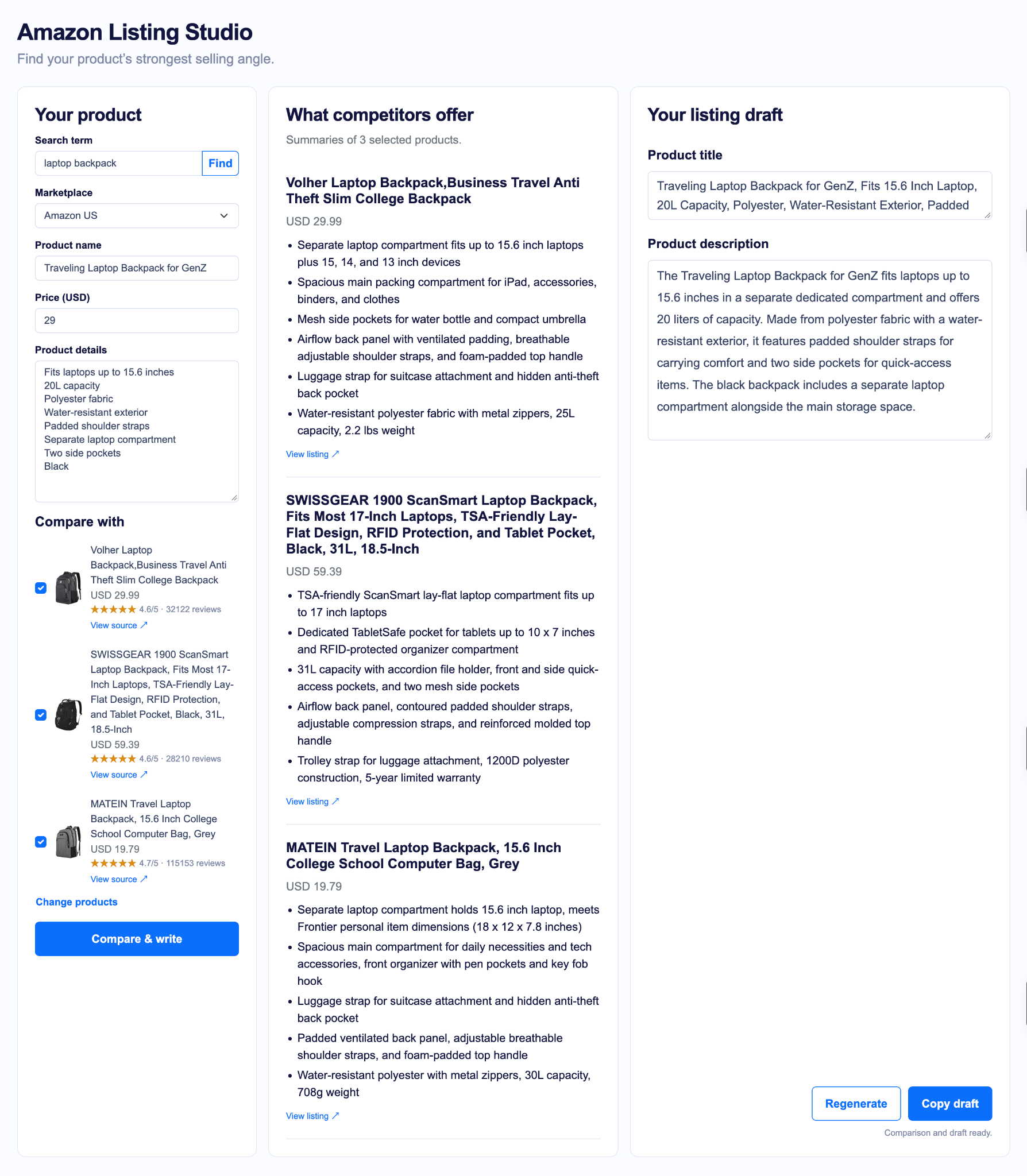
In the earlier post, I built a small tool that generates marketing copy for an Amazon product in different formats. This time, I want to go a step further. Before you write the product listing for your next awesome product, it helps to see how other products are represented on Amazon. Sounds cool, right? Like, what features are they highlighting that are helping them make more sales so that you can benefit from those while writing your copy? I built a Flask app that lets you search for products using keywords through SearchApi, select competitors’ listings, and compare them with your own product specs. The system then uses AI to generate a product listing title and description.
The final application will look like the following:
Prerequisites
In order to build this system, we will need a few things:
- Python: Version 3.10 or later.
- Flask to build the web application.
- Requests library. We will use it to access SearchAPI endpoints.
- A SearchApi API key to search for products and fetch listing data.
- OpenRouter to make API calls to LLM models
Alright, enough talk; let’s get our hands dirty
Development
UI design
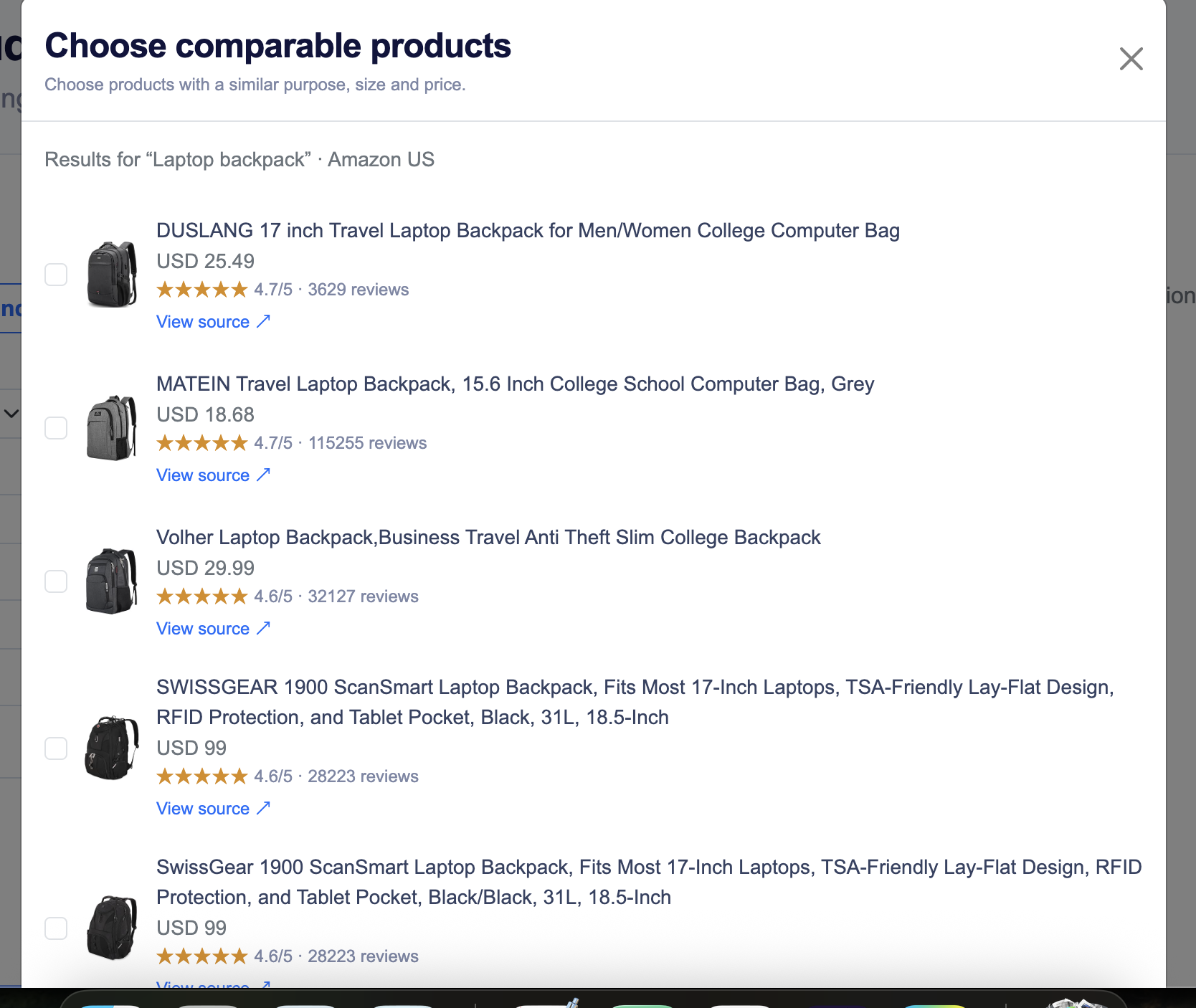
The very first thing we are going to do is create the UI of the system. I personally prefer the Bootstrap CSS framework for CSS-related stuff and jQuery for making API requests and handling UI interactions. You have already seen what the UI looks like in the screenshot above. I will explain it briefly. The left pane is all about adding your product details and searching for competitors. When you search for your competitors, it returns results like the ones below, and you pick the listing that is more aligned with your own product:
Next, we will be implementing backend APIs one by one.
Amazon Search API
This is our very first API endpoint we are going to implement. When you search for something, for instance, Laptop Backpack, it makes a request to /api/products/search. Below is the function we are using for this purpose:
@app.route("/api/products/search", methods=["POST"])
def search_products():
    data = request.get_json(silent=True)

    if not isinstance(data, dict):
        return jsonify({"error": "Send a valid JSON object."}), 400

    query = data.get("query")
    marketplace = data.get("marketplace", "amazon.com")

    if not isinstance(query, str) or not query.strip():
        return jsonify({"error": "Enter a search term first."}), 400

    currencies = {
        "amazon.com": "USD",
        "amazon.co.uk": "GBP",
        "amazon.ca": "CAD",
    }

    if not isinstance(marketplace, str) or marketplace not in currencies:
        return jsonify({"error": "Unsupported marketplace."}), 400

    api_key = os.environ.get("SEARCHAPI_API_KEY")

    if not api_key:
        return jsonify({"error": "SearchAPI API key is not configured."}), 500

    currency = currencies[marketplace]
    response = None
    try:
        response = requests.get(
            "https://www.searchapi.io/api/v1/search",
            headers={
                "Authorization": f"Bearer {api_key}",
            },
            params={
                "engine": "amazon_search",
                "q": query.strip(),
                "amazon_domain": marketplace,
                "currency": currency,
                "page": 1,
            },
            timeout=(5, 45),
        )

        response.raise_for_status()
        results = response.json()

    except requests.exceptions.Timeout:
        return jsonify({
            "error": "Product search timed out. Please try again."
        }), 504

    except requests.exceptions.HTTPError:
        if response.status_code == 429:
            return jsonify({
                "error": "SearchAPI request limit reached. Please try again later."
            }), 429

        return jsonify({
            "error": "SearchAPI could not complete the search."
        }), 502

    except requests.exceptions.RequestException:
        return jsonify({
            "error": "Unable to connect to SearchAPI."
        }), 502

    except ValueError:
        return jsonify({
            "error": "SearchAPI returned an invalid JSON response."
        }), 502

    if not isinstance(results, dict) or results.get("error"):
        return jsonify({
            "error": "SearchAPI could not complete the search."
        }), 502

    organic_results = results.get("organic_results", [])

    if not isinstance(organic_results, list):
        return jsonify({
            "error": "SearchAPI returned an unexpected response."
        }), 502

    products = []
    seen_asins = set()

    # Iterating returned results
    for item in organic_results:
        if not isinstance(item, dict):
            continue

        # Extracting ASIN and product title
        asin = item.get("asin")
        title = item.get("title")

        if (
                not isinstance(asin, str)
                or not re.fullmatch(r"[A-Z0-9]{10}", asin)
                or not isinstance(title, str)
                or not title.strip()
                or asin in seen_asins
        ):
            continue

        seen_asins.add(asin)

        products.append({
            "asin": asin,
            "title": title,
            "price": item.get("extracted_price"),
            "currency": currency,
            "rating": item.get("rating"),
            "reviews": item.get("reviews"),
            "image": item.get("thumbnail"),
        })

    return jsonify({"products": products})
I am doing some necessary validations, like the incoming JSON payload and selection of the marketplace and API Keys. It is quite obvious these days, but still, always put API Keys and secrets in an environment file and NEVER EVER push .env files to GitHub. After that, I am using the requests library to make an API call to the Amazon Product search endpoint provided by SearchApi. After that, I am iterating over the returned search results, doing validation of the product title and ASIN format, and storing them in a list of dictionaries. Finally, I return a JSONified result so that it can be shown on the screen, as I shared above.
Compare Listings API
The compare_listing() is accessed by making an api call to /api/listing/compare
The method takes in your product data and the ASINs of the competitors you have selected. Once the input is validated, it makes a call to the Product API to fetch individual listings and then passes competitors’ data, as well as your product data, to an LLM through OpenRouter. I wrote a system instruction prompt; it tells the model to create a summary for each competitor’s product and to come up with the search-optimized titles and descriptions based only on your product data. The fetch_competitor function is responsible for making an API call to the Amazon Product API endpoint. Below is the fetch_competitor function that makes an individual call to each ASIN and prepares the payload. It’d be nice if SearchAPI provided an endpoint to send multiple ASINs in a single request. I will be sharing the GitHub repo, and you can read the entire code on your own.
def fetch_competitor(asin, marketplace, api_key):
    try:


        response = requests.get(
            "https://www.searchapi.io/api/v1/search",
            headers={
                "Authorization": f"Bearer {api_key}",
            },
            params={
                "engine": "amazon_product",
                "asin": asin,
                "amazon_domain": marketplace,
                "currency": CURRENCIES[marketplace],
            },
            timeout=(5, 40),
        )
    except requests.exceptions.Timeout:
        raise UpstreamError(
            f"Product lookup timed out for {asin}. Please try again.",
            504,
        )
    except requests.exceptions.RequestException:
        raise UpstreamError("Unable to connect to SearchAPI.")

    if response.status_code == 429:
        raise UpstreamError("SearchAPI request limit reached.", 429)

    if not response.ok:
        raise UpstreamError(f"SearchAPI lookup failed for {asin}.")

    try:
        payload = response.json()
    except ValueError:
        raise UpstreamError("SearchAPI returned invalid JSON.")

    if not isinstance(payload, dict) or payload.get("error"):
        raise UpstreamError(f"SearchAPI could not retrieve {asin}.")

    product = payload.get("product")

    if not isinstance(product, dict):
        raise UpstreamError(f"No product details returned for {asin}.")

    title = product.get("title")

    if not isinstance(title, str) or not title.strip():
        raise UpstreamError(f"No product title returned for {asin}.")

    if product.get("asin") != asin:
        raise UpstreamError(f"SearchAPI returned a different ASIN for {asin}.")

    buybox = product.get("buybox")
    buybox = buybox if isinstance(buybox, dict) else {}

    price = buybox.get("price")
    price = price if isinstance(price, dict) else {}

    competitor = {
        "asin": asin,
        "title": title.strip(),
        "price": price.get("value"),
        "currency": price.get("currency"),
    }

    for field in (
            "description",
            "feature_bullets",
            "attributes",
            "specifications",
    ):
        value = product.get(field)

        if isinstance(value, (str, list, dict)):
            competitor[field] = value

    return competitor
Conclusion
So, we built an app that helps sellers to review Amazon listings of competitors and generate a title and description from their own product facts. SearchApi made it easy for us by offering us structured product data without needing to create an Amazon scraper for us, allowing us more time to concentrate on our application and AI prompts.
As always, the code is available on GitHub